


Labamu HRIS
Expense management software for claims and advances
Employees claim expenses and request advances from the mobile app, approvers decide in one inbox, and finance pays through payroll or by bank transfer. Every amount is tracked until it is settled.
Every claim and advance accounted for
Paper receipts and chat messages make claims slow to approve and hard to follow up. With expenses in one HRIS software, each claim carries its receipts, each advance shows what is still open, and finance sees what needs action next.
Claims and advances in one flow
In the app
Expense claims from the app
Add expenses with a receipt photo and submit in minutes.
Details ↓
Expense types and limits
Set what can be claimed and the maximum per expense.
Details ↓
In the app
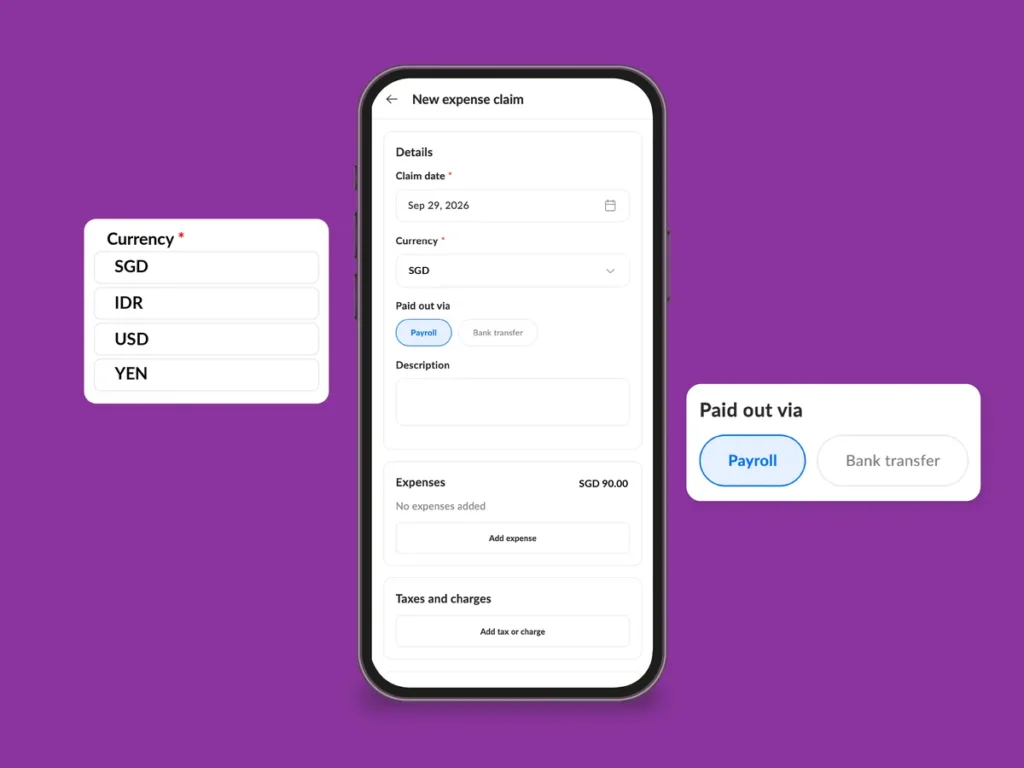
Claims in any currency
Employees enter the rate, and payroll pays in the company currency.
Details ↓
In the app
Employee advances
Request money before spending it and track what is still open.
Details ↓
Payment through payroll or transfer
Approved claims reach the payslip or a bank transfer.
Details ↓
Expense claims from the app
Employees list their business expenses in the mobile app, attach a receipt for each and send the claim for approval. Drafts can be saved during a trip and submitted at the end.
- Receipts from the camera, the gallery or a PDF file
- Taxes and charges added as a percentage or a fixed amount
- Pending claims withdrawn before the approver decides
- A summary of what is pending, approved and paid

Expense types and limits
Finance and HR decide which expense types can be claimed and set a maximum per expense. The app checks every expense against its limit before the claim is sent.
- Maximum amount per expense for each type
- A receipt attached to every expense before submission
- Accounting codes on each expense type
Claims in any currency
Employees can claim expenses paid abroad in that currency and enter the exchange rate. Payroll then pays the converted amount in the company currency.
- The last rate used in the company suggested for the same currency
- Totals shown in the claim currency and the company currency
- Foreign-currency claims switched on in HR settings when you need them
Employee advances
Employees request an advance in the app before a trip or a large purchase, and finance records the transfer once it is approved. Every advance shows what was paid, claimed, returned and is still open.
- Advances settled against expense claims, so only the difference is paid
- Partial payments recorded as they are transferred
- Unspent money recovered from salary, in instalments if needed
- Advance balance visible to employees in the app
Payment through payroll or transfer
Approved claims are paid with the next payroll or by bank transfer, and each claim is paid once. Finance works from one list of claims that still need a decision or a payment.
- Payroll claims added to the payslip as a non-taxable reimbursement
- Bank-transfer claims marked paid or included in a payout batch
- Open claims and advances added to the final settlement when someone leaves

Also included: multi-step approvals and the employee mobile app
How it works
Set up expense types
Finance or HR adds the expense types and their limits on the web.
Claim from the app
Employees add expenses with receipts, settle advances and submit the claim.
Approve in one inbox
The approver reviews the full claim with its receipts and approves or rejects it.
Pay and close
Approved claims go to payroll or a bank transfer, and their status changes to paid.
Expense management software FAQ
Can employees submit claims from their phone?
Yes. Claims are created in the mobile app, with a receipt photo or file for each expense, and sent for approval from there.
How are approved claims paid?
With the next payroll as a non-taxable reimbursement on the payslip, or by bank transfer recorded by finance.
Can we set limits per expense type?
Yes. Each expense type can have a maximum per expense, and the app checks every expense against it before the claim is submitted.
How do advances work?
Employees request an advance in the app, and once it is paid they settle it against claims, return what is left, or have it deducted from salary.
Can employees claim in another currency?
Yes, once foreign-currency claims are switched on. The employee enters the exchange rate, and payroll pays the converted amount in the company currency.
Keep every claim moving
See how Labamu HRIS takes claims and advances from receipt to payslip. Book a demo with our team.