


Labamu HRIS
Multi-country HR and payroll for every entity you run
Manage legal entities in different countries from one account, each with its own currency, time zone, pay schedule and tax settings. Payroll runs per entity, in the local currency.
One system as your company grows across borders
Every new country brings its own currency, holidays, tax rules and pay calendar. With every entity in one HRIS software, HR and finance work from the same employee data, whichever country the team is in.
Everything you need to run teams in several countries
Multiple legal entities in one account
Each entity keeps its own country, currency, time zone and pay schedule.
Details ↓
Work locations in any country
Each location has its own time zone, check-in area and holiday calendar.
Details ↓
Payroll in local currency
Salary structures carry their own currency, and payroll runs per entity.
Details ↓
Tax and contributions per entity
Each entity keeps its own tax and contribution settings.
Details ↓
Transfers between entities
Move an employee to another entity from a set effective date.
Details ↓
Multiple legal entities in one account
Set up each company you employ people through as its own legal entity. Every entity keeps its own settings, so headquarters and regional entities sit side by side under one login.
- Country, currency and time zone per entity
- Pay schedule per entity: pay frequency, cut-off day and pay day
- Approval rules that apply to one entity only

Work locations in any country
Add offices, warehouses and sites wherever your teams work. Attendance and leave follow the local time and the local holidays.
- Time zone per work location
- Check-in area with a radius for mobile check-in
- Holiday calendars assigned per entity or per employee
Payroll in local currency
Pay each team in its own currency from the same system. Each entity runs its payroll on its own schedule, with approval before anything is paid.
- Salary structures with their own currency
- Payroll calculated per entity, with approval before payout
- Bank file (CSV) for each payroll run
- Payslips in the employee app once salaries are paid

Tax and contributions per entity
Every entity carries its own tax and contribution settings, and each payroll run uses them. Your payroll team can set up income tax brackets for any country.
- Tax and contribution settings per entity
- Income tax brackets your payroll team can set up for any country
- Tax and social security numbers stored on each employee record
- Salary register and income tax reports as CSV
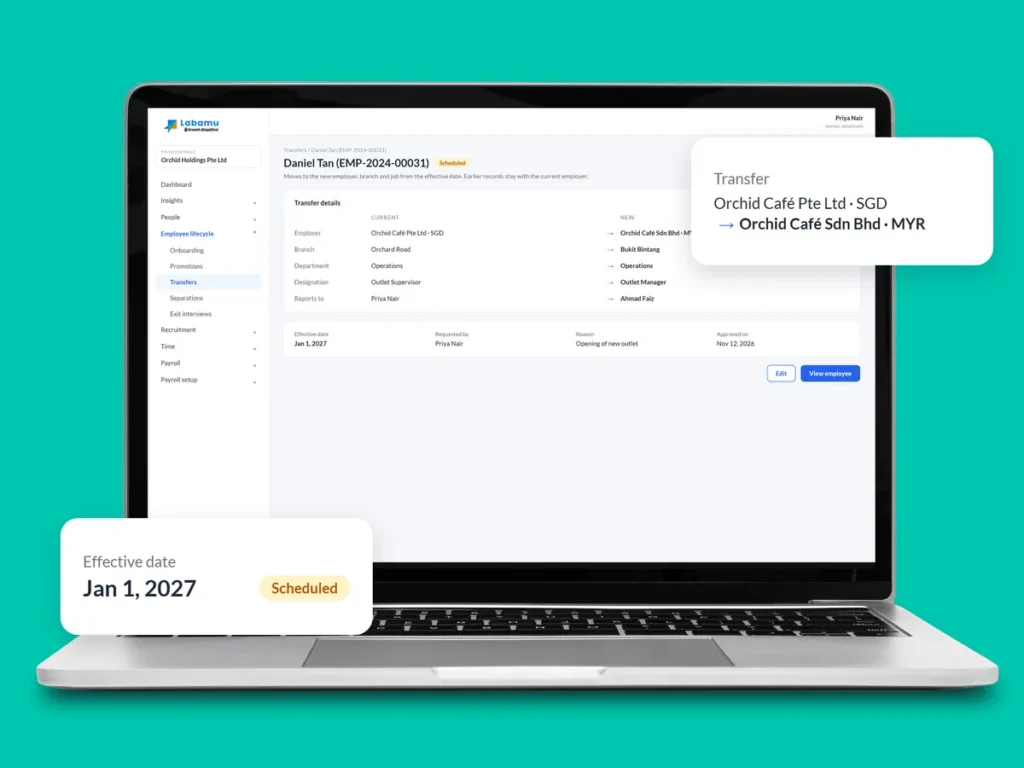
Transfers between entities
When someone moves to another entity or location, record the change once with its effective date. Their history stays in one record.
- Transfer to another legal entity or work location
- Change takes effect from the date you set
- Recorded in the employee’s history and used by attendance and payroll
Also included: multi-step approvals and the employee mobile app
How it works
Add your entities
HR sets up each legal entity with its country, currency, time zone and pay schedule on the web.
Add locations and calendars
Work locations get their time zone and check-in area, and each entity gets its holiday calendar.
Assign employees
Employees are placed under their entity and given a salary structure in the local currency.
Run payroll per entity
Each entity runs payroll in its own currency, with its own tax and contribution settings.
Multi-country payroll FAQ
How does payroll handle tax in different countries?
Each entity has its own tax and contribution settings, and its payroll runs on those settings.
Can we pay employees in different currencies?
Yes. Each salary structure has its own currency, so each team is paid in its local currency.
Do we need our own legal entity in each country?
Yes. Labamu HRIS manages employees under the legal entities your company sets up, with one account for all of them.
Does it file reports to government authorities?
It prepares the payroll data and reports your team needs. Filing to government portals stays with your team.
Can an employee move to another entity?
Yes. Record a transfer with an effective date, and the employee’s history, attendance and payroll follow from that date.
Run every entity from one account
See how Labamu HRIS handles your countries, currencies and entities in one system. Book a demo with our team.